
Forty tabs open.
Four in use.
Lulltab unloads the rest. They stay in your tab strip, give their memory back, and reload the moment you click them.
How a tab falls asleep
-
You leave it
The idle clock starts when you switch away from a tab — not when the page last changed.
-
Your timer runs out
After 15 minutes, or whatever you pick from 1 minute to 24 hours, Lulltab asks the browser to discard the tab. The page unloads. The tab, its title, and its icon stay put.
-
You click it
The browser reloads the page from its address, and the idle clock starts over.
While Lulltab is on, Chrome’s built-in Memory Saver can’t discard tabs on its own schedule. Only your timer decides.
What never sleeps
- The tab you’re looking at
- Pinned tabs
- Tabs playing audio
- Browser pages like
chrome://andaside:// - Tabs an Aside agent is working in
- Sites you keep
Keeping sites
| You type | Lulltab keeps |
|---|---|
github.com | github.com and every subdomain |
=mail.google.com | Only that exact host |
*.notion.so | Subdomains, not notion.so itself |
github.com/neel | That path and everything below it |
https://mail.google.com/mail | Any URL that starts with it |
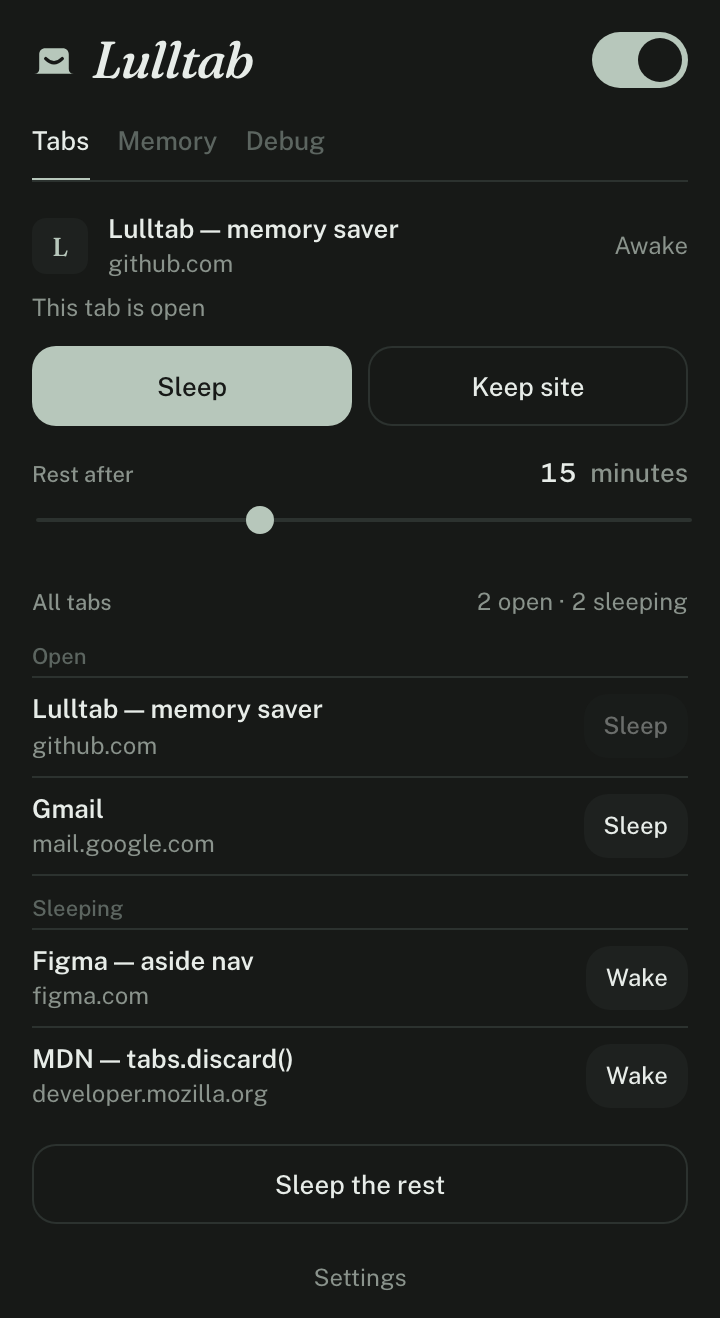
One click from the toolbar
- Sleep
- Unload the current tab now.
- Keep site
- Never sleep this site again.
- Rest after
- Set the idle timeout.
- Sleep the rest
- Unload every tab except this one.
- Memory
- See how much RAM each open tab is using, largest first.
- Alt Shift S
- Sleep the current tab from the keyboard. Right-click any page for the same options.
Nothing leaves your browser
Lulltab makes no network requests. There’s no server, no analytics, and no account. Settings stay in chrome.storage.local. Here is what each permission is for.
tabs | See your tabs and discard idle ones. |
|---|---|
alarms | Check the idle timer once a minute. |
storage | Save your timeout and kept sites on this device. |
contextMenus | Add Sleep this tab and Never sleep this site to the right-click menu. |
tabGroups | Leave tabs in an Aside agent’s group alone. |
processes, system.memory | Measure memory per tab for the Memory view. |
scripting, all sites | Read a page’s memory use when the browser doesn’t report it per process. Nothing else is read. |
Install in a minute
Lulltab isn’t on the Chrome Web Store yet, so you load it yourself. It works in Chrome, Aside, Brave, Edge, and other Chromium browsers from version 116.
- Download
lulltab.zipand unzip it. - Open
chrome://extensions(oraside://extensions) and turn on Developer mode. - Click Load unpacked and pick the unzipped
lulltabfolder. - Pin Lulltab to the toolbar. Tabs start sleeping after 15 minutes.
Prefer the source? git clone https://github.com/neelsatyavolu/lulltab and load the folder as-is. There’s no build step.